Phrase Maker: Teaching My Computer Music Theory
It started with a simple, slightly lazy thought one weekend: “Can I write a script to noodle on the piano for me?”
I’ve recently gotten into composing ambient piano music, and that introduced me to generative music. Not AI-generated music—there’s plenty of that to go around—but using code and math to generate music in real time. I wanted something that could sketch out melodic lines that I could use as a background for my actual piano playing.
I tried some Reaper plugins that could generate notes based on chords but didn’t like any of them, so I decided to try and write my own. I’ve been coding and playing piano for 30+ years; how hard could it be, right? I had the perfect set of skills needed to pull this off.
Well, it turns out, this is really hard. What followed was a deep dive into the logic of generative MIDI, probability curves, and a lot of trial and error. It was also a journey into realizing the limitations of “vibe coding” (coding by describing what you want to an AI rather than writing the code yourself).
Here is the journey of Phrase Maker, from a basic randomizer to a chord-aware musical sketchpad.
Stage 1: The “technically correct” phase
The first version was pretty simple. It knew some basic scales and chords, and randomly decided on the next note to play while trying to prioritize chord tones. It generated notes, and technically, they were the correct notes.
But musically? It was rough. Because the engine had no concept of phrasing, it just played notes in a vacuum. It was strictly adhering to the rules of C Major, yet somehow managed to sound completely unmusical. Rests felt random and abrupt. I had a script that made phrases, but they certainly weren’t music.
Stage 2: The Architecture Pivot
My first realization was that trying to decide the next note to play based on a complex set of probabilities wasn’t going to work. Especially when I also wanted constraints like “don’t jump too many notes” or “stay within these two octaves.” For example, the first version of the plugin would climb its way up to the top C and then get stuck there. It was actually really funny to hear it playing.
I realized that I needed to plan out complete musical phrases, not decide on one note at a time. (I guess that’s what I subconsciously do even when I’m playing the piano?)
I rewrote the architecture to separate Phrase Generation from Playback. Now, the engine would pre-build the entire melodic arc before the first note triggered. And when I say “I rewrote the architecture,” I mean “I typed instructions into the VSCode chat window and told the AI what I wanted it to do.”
I also realized that staying on one chord gets boring fast. I added the Progression Sequencer. Now, the engine wasn’t just noodling on a chord; it was able to navigate a I - vi - ii - V progression (a common chord sequence in pop music) and create phrases that actually matched the chords. I weighted Chord Tones (Root, 3rd, 5th) higher than generic scale tones. The commit message that night: “Chord aware, not sounding great.”
Stage 3: Taming the Randomness
The notes were right, but the movement was robotic. I wanted to get the phrases flowing better. The AI came up with the idea of a Two-Phase Generation Engine:
- Exploration: The phrase starts by wandering away from the root, exploring the scale.
- Resolution: As the phrase ends, the engine actively calculates a path to land on a target note that fits the chord in the measure where the phrase ends.
This was the first hint of decent voice leading, especially when a phrase started in one chord and ended in another. I started adding more rules to the phrase generation logic:
- Jump Limiting: No jarring leaps larger than 7 semitones.
- Recency Penalty: If you just played a C#, don’t play it again immediately.
- Consecutive Skip Limits: Prevents the melody from sounding like a mindless arpeggio.
Stage 4: Eye Candy and More Musicality
Somewhere along the way, I added a debug screen to help me see what the phrase generator was doing. I realized it would be interesting to see the phrases as they were being played, so I asked the AI to create a Real-time Piano Roll Visualizer:
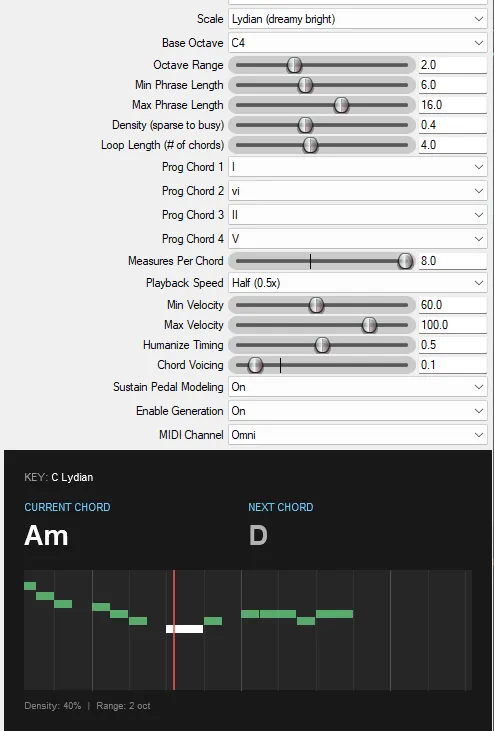
I also added a Speed Multiplier to scale phrase playback independent of project tempo, and implemented Downbeat Snapping to try and resolve phrases on strong beats.
Stage 5: The Human Element
Getting the notes right was one thing, but getting it to feel like a piano player was another. I realized that computer-perfect timing is the enemy of emotion.
I implemented a Humanization Engine that does more than just jitter the start times. It correlates velocity with timing—softer notes arrive slightly late, mimicking the mechanics of a real piano action. It also varies note durations, occasionally playing staccato notes for texture.
Then came Harmony. A single melodic line is nice, but a pianist often harmonizes with their other fingers. I added a probabilistic “Chord Voicing” system. It looks for stable chord tones (like the Root or 5th) and, if the note is held long enough, adds a harmony note a third above or below. It’s subtle, but it adds a lot of depth.
I also added Pedal Modeling. It’s not just on/off; it models “harmonic mud.” It holds the pedal to let chord tones ring out, but automatically lifts it if too many non-chord tones (passing notes) create dissonance.
Finally, I overhauled the Timing Logic. Instead of just picking a note duration, the engine now calculates “Density.” Low density creates space and rests; high density creates busy, legato runs. It even understands that important notes (like the root of the chord) deserve more “breathing room” after they are played than passing tones do.
I’m nowhere close to being done, but this now feels ready to share and get feedback.
You can listen to a short clip of the plugin in action here. The piano melody was 100% generated by the plugin.
What I Learned
Generative music still needs to sound like music. Weighting systems and probability curves are just tools. The goal is always the same: Does it sound intentional? With each version, it’s getting slightly better.
Vibe coding is hard if you don’t know coding. The first several versions were completely generated by AI; I didn’t really look at the code it produced. When I eventually looked under the hood, I realized the AI had created a structural mess. I had to step in and explicitly dictate the architecture.
For example, when I told it to change the prediction model, it wrote code that generated notes in a sequence but decided on timing (8th notes, rests) while it was playing. It was impossible to create coherent phrases until I forced all the generation to happen in one place.
The Code
Phrase Maker is open-source under the MIT License. You can grab it via ReaPack or check the source on GitHub.
Does it still sound like a computer? Yes, most of the time. But every now and then it comes up with something that makes me smile. And as a sketchpad, a collaborator, and a source of happy accidents? It’s ready to play.
Join my mailing list
Occasional updates on new music. Unsubscribe anytime.